
OpenSKP Documentation
The open-source SketchUp (.skp) file toolkit — parse, write, and convert .skp files, natively in Python, TypeScript, .NET, Dart, and C++. Convert SketchUp models to glTF (GLB), OBJ, STL, PLY, DXF, IFC4, and JSON with no SketchUp SDK, no license, both the modern VFF (2021+) and classic MFC (2013–2020) formats supported. This page is the detailed, verified developer reference; the full write-ups live in docs/ on GitHub.
5
Languages
7
Convert-to formats
1,306
Tests passing
620MB
Largest file verified (.NET)
2
Container formats (VFF + legacy MFC)
Installation
Pick your language — the API is equivalent across all five
bash
pip install openskppython
from openskp import SkpFile

model = SkpFile.open("my_model.skp").parse()
print(model.version, len(model.layers))

# Opt-in: full placed scene graph, triangulated, world-space, GLB-ready
scene = SkpFile.open("my_model.skp").build_scene()
print(len(scene.glb_primitives), "mesh primitives")
bash
npm install openskptypescript
import { SkpFile, toGLB } from 'openskp'

// Node.js
const model = SkpFile.open('my_model.skp').parse()

// Browser - same package, isomorphic
// const buffer = await fetch('my_model.skp').then(r => r.arrayBuffer())
// const model = parseSkp(buffer)

const scene = SkpFile.open('my_model.skp').buildScene()
const glb = toGLB(scene)   // ready to write to a .glb file
bash
dotnet add package OpenSkpcsharp
using OpenSkp;

var model = SkpFile.Open("my_model.skp");
Console.WriteLine($"{model.Version} - {model.Layers.Count} layers");

var scene = SkpFile.BuildScene("my_model.skp");
Console.WriteLine($"{scene.GlbPrimitives.Count} mesh primitives");
bash
dart pub add openskpdart
import 'package:openskp/openskp.dart';

final model = SkpFile.open('my_model.skp').parse();
print('${model.version} - ${model.layers.length} layers');

final scene = SkpFile.open('my_model.skp').buildScene();
print('${scene.glbPrimitives.length} mesh primitives');
cmake
find_package(OpenSkp CONFIG REQUIRED)
target_link_libraries(your_target PRIVATE OpenSkp::OpenSkp)
cpp
#include <openskp/openskp.hpp>

auto skp = openskp::SkpFile::open("my_model.skp");
auto model = skp.parse();

auto scene = skp.build_scene();
auto glb = openskp::to_glb(scene);
openskp::export_glb(scene, "my_model.glb");
std::cout << scene.glb_primitives.size() << " mesh primitives\n";
No package registry today - build/install from source (or download a release tarball) via CMake, then
find_package(OpenSkp CONFIG REQUIRED). See GitHub Releases for tagged source packages.Core Concepts
Two entry points, and why they're separate
parse()
Light, defaultReads each component/group definition's geometry exactly once — vertices, edges, faces, and the un-resolved instance placements (which definition, what transform). No scene-graph walking, no triangulation. This is what you want for metadata inspection, custom geometry processing, or anything that doesn't need a renderable mesh.
buildScene()
Opt-in, heavierWalks the entire placed scene graph: every instance of every component, nested arbitrarily deep, each with its transform resolved to world space, each face triangulated (a ported earcut — the same algorithm in all five languages) and grouped by resolved color into GLB-ready mesh primitives. For a file that reuses a handful of definitions across many thousands of placements, this can produce far more data than the file's raw geometry — that's why it's a separate, opt-in call.
Calling both
parse() and buildScene() re-parses the raw TLV data twice — a deliberate trade of extra CPU time for guaranteeing parse() alone never pays for scene-baking's cost. They're independent, not layered.Creating Files
create() — build a new .skp file from nothing, all five languagesOpenSKP can also go the other direction:
create() returns an SkpBuilder that assembles a genuine legacy MFC CArchive-format .skp file (SketchUp 2013–2020) from nothing — geometry, materials, layers, component definitions, and groups — with no SketchUp SDK involved at import, build, or save time. It works by inverting this project's own reader logic against a small bundled blank-document scaffold.Every feature on this page has been validated feature-by-feature against the real SketchUp SDK (
SketchUpAPI.dll), not just against this project's own reader — and it holds up rebuilding complex, real architectural models, not only synthetic test fixtures.Landed in Python first, then ported to TypeScript, .NET, Dart, and C++ — the identical feature set is now available in all five languages (1.1.0). Combined with the export formats below, this makes OpenSKP a genuine SketchUp file converter in both directions this project targets: build a
.skp from nothing, or convert an existing one to glTF/OBJ/STL/PLY/DXF/IFC4/JSON.Materials, layers & geometry
Solid-color and PNG/JPEG-textured materials, and named layers with their own color and default visibility — reused by name across every face, instance, and group you place.
python
from openskp import create

builder = create()
red = builder.add_material("Red", (255, 0, 0))
brick = builder.add_texture_material("Brick", "brick.png")
roof = builder.add_layer("Roof", color=(180, 60, 40))

builder.add_face(
    [(0, 0, 0), (200, 0, 0), (200, 150, 0), (0, 150, 0)],
    material=red, layer=roof,
)
builder.save("output.skp")
Definitions, instances & groups
Reusable component definitions with multiple positioned instances, one-off groups, and nesting to any depth — a definition can place instances or groups of its own already-built sub-parts, the same way a real SketchUp assembly does.
python
with builder.add_component_definition("Wheel") as wheel:
    wheel.add_face([(0, 0, 0), (10, 0, 0), (10, 10, 0), (0, 10, 0)])

with builder.add_component_definition("Car") as car:
    car.add_instance(wheel, translation=(0, 0, 0))
    car.add_instance(wheel, translation=(100, 0, 0))

builder.add_instance(car, translation=(0, 0, 0))
with builder.add_group("Table", translation=(200, 0, 0)) as table:
    table.add_face([(0, 0, 0), (60, 0, 0), (60, 40, 0), (0, 40, 0)])
One ordering rule falls out of the format's own slot numbering: every
add_component_definition/add_group call must happen before any add_face/add_instance call on the builder itself.Rotation & visibility
rotation=(axis, angle_radians) is a shortcut for a hand-derived matrix3x3, and every placement — instance or group — can be created hidden=True (its contents still exist in the file, just not shown by default).python
import math

builder.add_instance(wheel, translation=(0, 0, 0), rotation=((0, 0, 1), math.radians(90)))
builder.add_instance(wheel, translation=(100, 0, 0), hidden=True)
Curved geometry
add_circle/add_arc write a genuine, editable-by-radius CArcCurve entity — not disconnected straight edges that merely trace the shape. add_polyline groups an arbitrary edge chain into one real CCurve entity, the same grouping SketchUp's own Freehand tool produces.python
builder.add_circle((100, 75, 0), normal=(0, 0, 1), radius=30, num_segments=24)
builder.add_arc((100, 75, 0), normal=(0, 0, 1), radius=30, start_angle=0, end_angle=math.pi / 2)
builder.add_polyline([(0, 0, 0), (10, 10, 0), (20, 0, 0), (30, 10, 0)])
Faces: holes & non-planar input
A face can have one or more holes cut out of it (a window opening in a wall) via
holes=, and auto_triangulate=True fan-triangulates non-planar input instead of raising — the same silent fallback real SketchUp's own UI applies to a not-quite-flat quad.python
wall = [(0, 0, 0), (200, 0, 0), (200, 100, 0), (0, 100, 0)]
window = [(80, 30, 0), (120, 30, 0), (120, 70, 0), (80, 70, 0)]
builder.add_face(wall, holes=[window])

warped_quad = [(0, 0, 0), (10, 0, 0), (10, 10, 0), (0, 10, 5)]
builder.add_face(warped_quad, auto_triangulate=True)  # -> 2 triangular faces
Texture positioning & custom attributes
A face's texture can be explicitly positioned (scaled, rotated, sheared, offset — independently per side) via 3 world-point/UV correspondences, on a face of any orientation. Component definitions, instances, and faces can also carry custom key/value metadata — the same mechanism SketchUp's own "dynamic component" attributes use.
python
builder.add_face(
    [(0, 0, 0), (100, 0, 0), (100, 100, 0), (0, 100, 0)],
    material=brick,
    front_uv=[((0, 0, 0), (0.0, 0.0)), ((50, 0, 0), (1.0, 0.0)), ((0, 50, 0), (0.0, 1.0))],
)

with builder.add_component_definition("Chair", attributes={"sku": "CH-100", "price": 49.99}) as chair:
    chair.add_face([(0, 0, 0), (20, 0, 0), (20, 20, 0), (0, 20, 0)])
Scope at a glance
| Feature | Status |
|---|---|
| Solid + PNG/JPEG-textured materials | ✓ |
| Layers with color & default visibility | ✓ |
| Component definitions, multi-instance, groups, nesting | ✓ |
| Instance/group rotation & hidden state | ✓ |
| Circular/arc curves & freeform polylines | ✓ |
| Faces with holes & auto-triangulation | ✓ |
| Explicit per-side texture positioning | ✓ |
| Custom attributes on definitions/instances/faces | ✓ |
| Attributes on groups | ✗ not yet |
| Modern VFF (2021+) output | ✗ legacy format only |
See
openskp/create.py for the full, current scope notes.Editing Existing Files
openskp.open_existing() — load a file that already exists, and extend itopenskp.create() only ever starts from its own blank scaffold. Real SketchUp never patches a file in place either — it fully re-serializes the whole document on every save — so there's no stable byte region to append to for an arbitrary existing file. open_existing() takes the same approach real SketchUp effectively does: parse → replay → extend → save. It fully parses the source file with this project's own reader, then replays everything it understood — materials, layers, every component definition, all root-level geometry and instances — back through the writer's own public API, producing a brand-new file with equivalent content that more geometry can still be added to.python
from openskp import open_existing

builder, warnings, definitions = open_existing("building.skp")
for w in warnings:
    print("not fully reproduced:", w)

# Every material/layer the source had is already reusable, no separate lookup:
roof = builder.materials_by_name.get("Roofing")
builder.add_circle((0, 0, 100), (0, 0, 1), radius=50, material=roof)

# definitions maps each replayed component's own name to its builder:
builder.add_instance(definitions["Window"], translation=(0, 300, 0))
builder.save("building_edited.skp")
What can and can't be added afterward
The returned builder is ready for more
add_face/add_circle/add_instance/etc. calls, reusing every material and layer the source already had. What it can no longer do is register a genuinely new material, layer, or component definition/group — by the time replay finishes writing the source's own root-level geometry, this writer's usual file-format ordering requirement (materials/layers/definitions must be finalized before any geometry) is already satisfied.add_material, add_layer, add_component_definition, and add_group all raise on a builder returned by open_existing() — build anything genuinely new into a separate create() call instead.Known fidelity gaps
The returned
warnings list is the honest, per-file account of what couldn't be faithfully reproduced. Only a legacy-format (2013–2020) source is accepted, for the same reason the writer only ever produces that format. Round-trip-validated against real, non-writer-authored architectural models, not just files this project's own writer produced.| Gap | Detail |
|---|---|
| Per-edge flags | hidden/soft/smooth are applied per-face, not per-edge — an "any edge in this boundary has the flag" approximation |
| Projective textures | positioned textures replay via a 3-point affine fit — exact at those points, but a genuinely projective/distorted source mapping won't interpolate identically. A draped/projected texture falls back to the default projection |
| Colorized tint | a colorized (tinted) material replays as its plain source texture, losing the tint — its real-world texture tile size is preserved, via an explicit UV pin on every replayed textured face |
| Per-face layer painting | only a face's front/back material is replayed — the reader doesn't expose a per-face layer assignment |
| Group vs. instance | every placed thing replays as a plain component instance — visually identical, but no longer shows as a "Group" in SketchUp's Outliner |
| Section planes, text, dimensions | not carried over at all — the writer has no support for these entity types |
| Curve grouping | a circle/arc/polyline's original curve grouping is lost — the reader doesn't preserve it, so it round-trips as a plain straight-edged face |
| Definition/face attributes | not reproduced — the reader's public model doesn't expose either (only an instance's own properties are) |
See
openskp/edit.py's own module docstring for the complete, itemized list and the reasoning behind each one.Generating Code From a File
openskp.to_python_code() — turn a parsed file into re-runnable source, not a builderEvery language has an equivalent —
to_python_code(), toTypeScriptCode(), Codegen.ToCSharpCode(), toDartCode(), to_cpp_code(). It takes the opposite approach from open_existing(): instead of a builder you keep editing programmatically, it returns a string of source code — a faithful, human-readable, re-runnable transcript of create()/SkpBuilder calls that rebuilds an equivalent file when run. Materials (solid and textured, with explicit UV pins), layers, component/group definitions in dependency order, faces with holes, and instance-level paint and names (including a genuinely empty name) are all reproduced.python
from openskp import SkpFile, to_python_code

model = SkpFile.open("building.skp").parse()
print(to_python_code(model))
generated output
import base64
import os
import tempfile

from openskp import create


def build():
    builder = create()

    # --- Materials (1) ---
    mat0 = builder.add_material('Red', (255, 0, 0, 255))

    # --- Layers (2) ---
    layer0 = builder.add_layer('Layer0', color=(255, 84, 84), hidden=False)
    layer1 = builder.add_layer('Roof', color=(200, 60, 60), hidden=False)

    # 'Wheel' - 1 faces, 0 nested instances
    with builder.add_component_definition('Wheel') as def0:
        def0.add_face([(0.0, 0.0, 0.0), (10.0, 0.0, 0.0), (10.0, 10.0, 0.0), (0.0, 10.0, 0.0)], material=mat0, auto_triangulate=True)

    # --- Root instances (1) ---
    builder.add_instance(def0, translation=(50.0, 0.0, 0.0), matrix3x3=(1.0, 0.0, 0.0, 0.0, 1.0, 0.0, 0.0, 0.0, 1.0), material=mat0, name='')

    return builder.to_bytes()
Why generate code instead of editing directly
Useful anywhere a file's structure is more valuable as editable code than as an opaque binary — handing a real model to an AI coding agent as a starting point it can read and modify without executing anything first, generating a diffable, reviewable text representation of a
.skp file for version control, or understanding how a specific file was built without a SketchUp license. It's not a replacement for open_existing()'s programmatic editing — the returned string still needs to be executed to produce a file — and shares every fidelity gap listed above, since both reuse the same UV/hole/instance-paint reconstruction logic.Every textured face gets an explicit UV pin in the generated output — even ones that originally used default projection — so the regenerated material's applied height never needs to match the source's.
AI-Generated Models
Why the writer above works well as an AI coding-agent target
The writer's API is generic on purpose - no
add_chair() or add_staircase() helpers, just materials, faces, components, and instances. That turns out to make it an unusually good target for AI coding agents: no object-specific primitives library is needed for an agent to compose arbitrary shapes, since it already knows how to turn a description into geometry once the API is in context.Every model below was generated from a natural-language (or reference-photo) prompt, by two independent AI agents, using nothing but the raw
create() API documented on this page - no primitives library, no hand-authored geometry.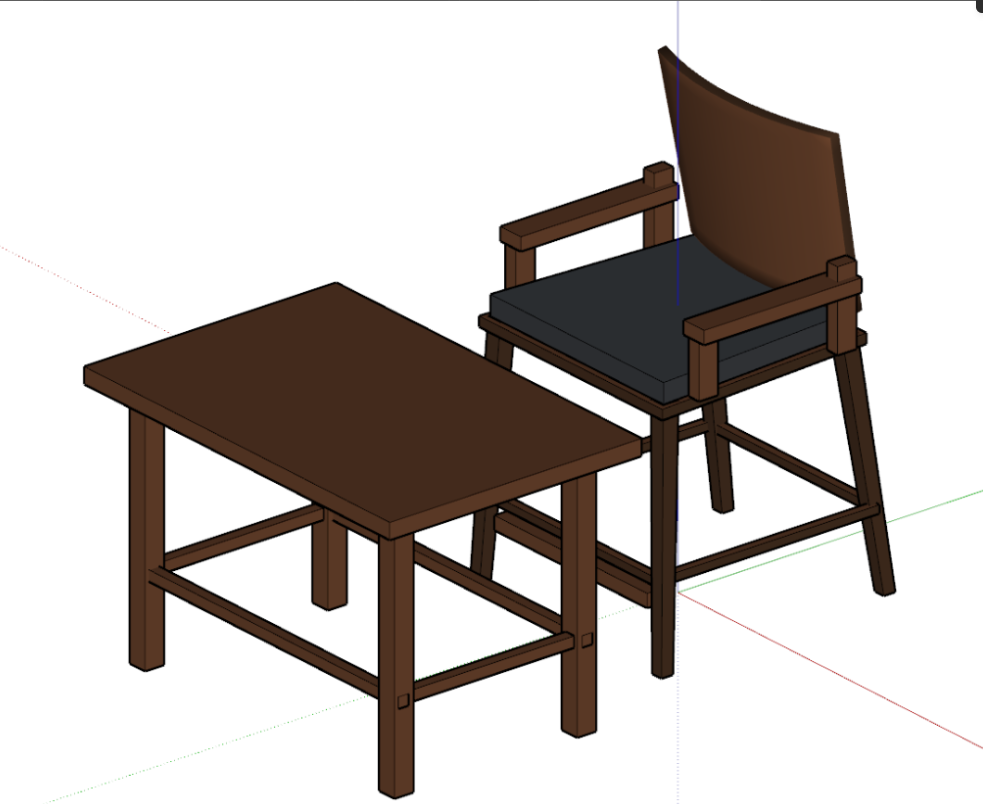
Armchair + side table - tapered legs, curved tessellated backrest
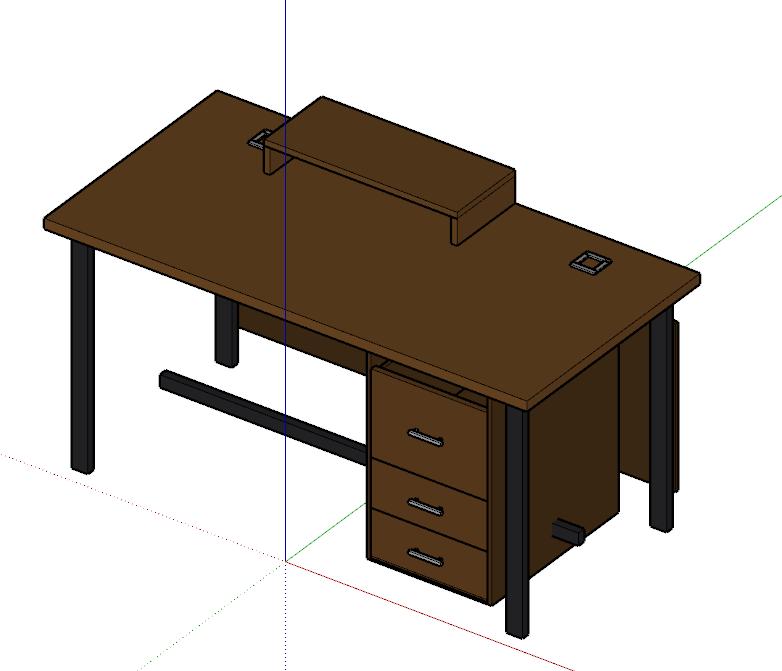
Executive desk - 8 nested component definitions
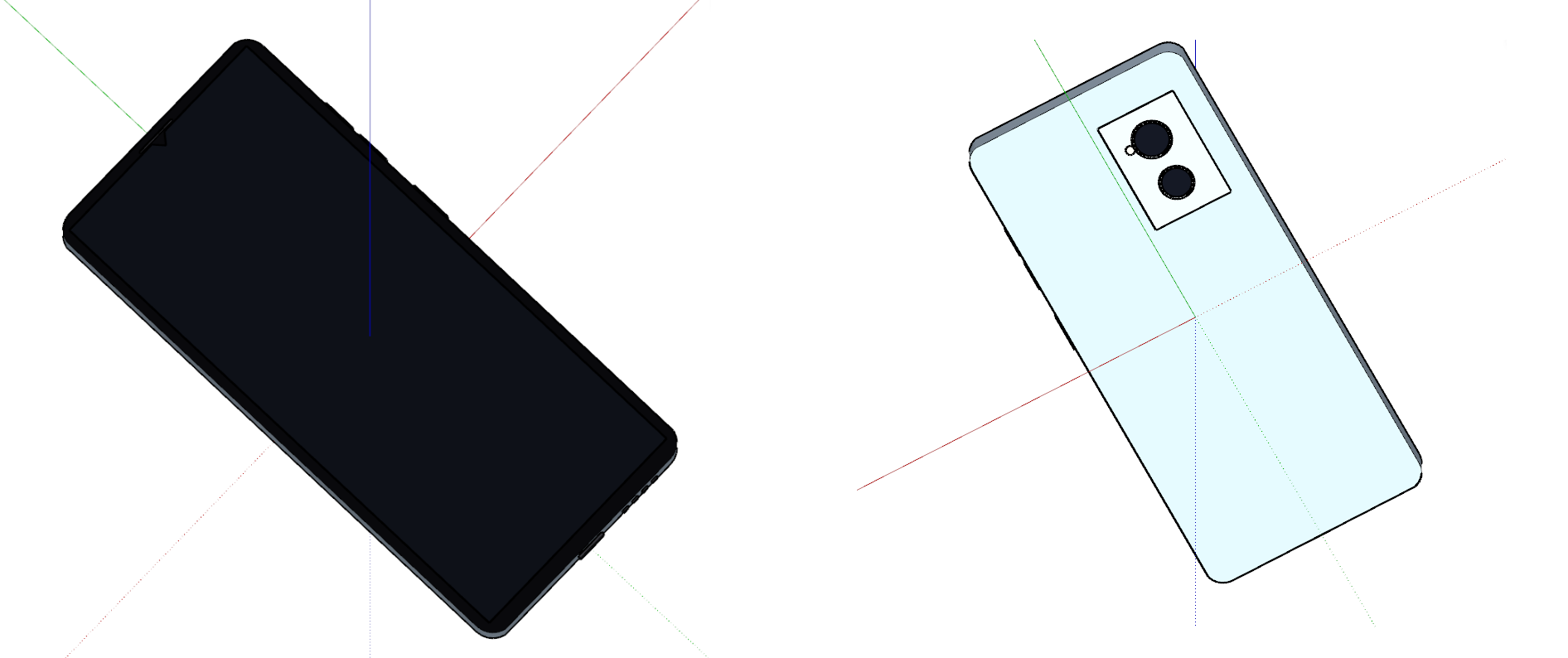
Smartphone - modeled directly from a product reference photo
Two more real models - a mid-century dining chair + accent table (9 component definitions, 38 meshes, 4 materials) and a small gable cottage (6 materials including translucent glass) - were generated the same way but don't have a saved render yet; both are documented with their exact stats and a real code excerpt in the full write-up below.
This isn't a roadmap item - it works today. Point your AI coding agent at this page (or any package README's Writing section) and a concrete goal in plain language, and it can write and run real
create() code against the same API documented above. See docs/AI_MODELING.md on GitHub for the full write-up, including a real code excerpt and open directions for contributors.Data Model
Structurally equivalent output across all five languages
All five languages produce the same shape for the same file — cross-validated directly against each other on real fixtures, not just against each language's own idea of what the format means. Coordinates are inches, Z-up (SketchUp's native units) in
parse()'s result; buildScene()'s output converts to meters, Y-up (glTF convention).| Concept | Python | TypeScript | .NET | Dart | C++ |
|---|---|---|---|---|---|
| definitions | dict[int, Definition] | Map<number, Definition> | Dictionary<long, Definition> | Map<int, Definition> | std::map<EntityId, Definition> |
| Vertex | id, x, y, z | {id, x, y, z} | Id, X, Y, Z | id, x, y, z | id, x, y, z |
| Edge | id, v1_id, v2_id, soft, smooth, hidden | camelCase | PascalCase | camelCase | snake_case (matches Python) |
| Face | id, loops, normal, material_id, back_material_id, uv_transform | camelCase | PascalCase | camelCase | snake_case (matches Python) |
| Layer | name, color_r, color_g, color_b | name, color:{r,g,b} | Name, ColorR/G/B | name, colorR/G/B | name, color (std::array<uint8_t,3>) |
The root definition
Every
.skp file has an implicit top-level definition — geometry drawn directly in the model (not inside any component/group) and the top-level placed instances. How each language exposes it is not currently uniform — see Known Differences before assuming one language's shape applies to another's.Legacy Format Support
SketchUp 2013–2020, classic MFC container
SketchUp 2021 switched
.skp's container from a classic MFC CArchive object-graph serialization (versions 8 through 2020, internally versions 13–20) to the modern VFF/ZIP container. OpenSKP reads both, transparently — SkpFile.open()/.parse() auto-detects which era a file uses by its header bytes and routes to the matching walker. There is no separate API to call for old files, and the resulting SkpModel/Scene shape is identical either way.The legacy walker was reverse-engineered independently of the public "2017 format notes" — several details (edge/loop record ordering, entity preamble structure, per-version byte-count differences between v16 and v17+) were established by clean-room analysis and cross-validated against the same models re-saved as VFF, matching face/edge counts, surface area, and bounding boxes exactly.
Legacy files cost more CPU per byte than modern VFF files (the MFC object-graph format requires resolving a shared, order-dependent slot table rather than a self-describing TLV tree) — but the same lazy, streaming architecture applies. See Performance.
Performance & Memory
The architecture change that made large real files actually work
The memory architecture
Real production
.skp files can have well over 100,000 separate component definitions. The naive approach — parse the entire file into one in-memory tree, then walk it — means peak memory scales with the whole file's node count, which is what made large files crash outright before this was fixed.All five languages now parse one top-level record at a time: a cheap flat header scan (O(sibling count), not O(total node count)) finds each top-level definition/layer-manager/material-manager/root block, fully builds only that one record's subtree, hands it to the caller, and lets it be garbage-collected before the next one is built. Peak memory during the walk is bounded by the size of the single largest top-level record, not the file's total size. The per-tag extraction logic was untouched — only the orchestration loop changed.
.NET's additional fix: the CLR's array and
MemoryStream types have a hard ~2.1GB ceiling regardless of GC settings, and a decompressed model.dat can exceed that (SketchUp's format commonly compresses at ~10x). This needed a genuine architecture addition: ChunkedBuffer (a multi-segment byte buffer) plus widening every TLV offset from int to long. As a result, .NET has no practical file-size ceiling today — verified against a 620MB real file (153,586 definitions) with zero special configuration.Verified numbers (real files)
| Language | File size | Definitions | Config needed | Time |
|---|---|---|---|---|
| .NET | 620 MB | 153,586 | none | ~230–270s parse, ~17s scene build |
| Python | 294 MB | 336,254 | none | ~400s |
| Dart | 294 MB | 336,253 | --old_gen_heap_size=4096 | ~82s |
| TypeScript | 18.5 MB | 1,264 | none | ~4s |
| TypeScript | 113 MB | 132,879 | --max-old-space-size=16384 | ~34s |
| TypeScript | 294 MB | 336,254 | — | fails even at 16GB heap |
Python and .NET need no configuration regardless of file size in the files tested. Dart and TypeScript run on their own VM/engine heap, which defaults to a few GB — for files past roughly 50–100MB, raise it:
bash
# Dart
DART_VM_OPTIONS="--old_gen_heap_size=4096" dart run your_script.dart

# Node.js
node --max-old-space-size=8192 your-script.js
TypeScript's ceiling is a real, currently open limitation — not just "needs a bigger flag." A 113MB file needed somewhere between 8GB and 16GB of heap, and a 294MB file failed even at 16GB. This is very likely V8's per-object memory overhead on the millions of individual small
{id,x,y,z}-shaped objects a large file's vertices/edges/faces become. A browser tab has no equivalent of --max-old-space-size — the practical ceiling there is lower still (confirmed directly: a 113MB file hangs a browser tab outright). Practical guidance: TypeScript is solid up to the tens-of-MB / low-hundreds-of-thousands-of-definitions range; for larger files, prefer Python or .NET, or process server-side rather than in a browser tab.Observability
Opt-in progress reporting and structured, location-carrying errors — silent by default
Every port exposes the same two things about a parse or scene-bake in progress: progress (how far through the file the walk has gotten) and structured errors (exactly where a failure happened, if one does). Neither is on by default — OpenSKP never prints or logs anything unless you ask, and you wire it into whatever logging/monitoring your own application already uses.
| Stage | Meaning |
|---|---|
| header | File doesn't start with the VFF magic marker — not a .skp file, or unrecognized format |
| zip_extract | Valid header but no embedded ZIP found, or no model.dat entry (VFF path only) |
| tlv_walk | Failure walking model.dat's top-level records (modern VFF path). Carries recordIndex/totalRecords/tag |
| legacy_walk | Failure walking the classic MFC CArchive object stream |
| legacy_defs | Failure converting walked legacy objects into definitions. Carries definitionId |
| build_scene | Failure baking placed instances into a scene — almost always a triangulation failure. Carries definitionId |
Per-language mechanism
Python uses the standard
logging module (logging.getLogger("openskp")) — progress is reported as DEBUG-level log records rather than a second parallel mechanism, matching Python's ecosystem convention. TypeScript/.NET/Dart don't have an equivalent stdlib-blessed logging façade, so they use an explicit options object with onProgress/onLog callbacks (IProgress<T>-based in .NET).python
import logging
logging.basicConfig(level=logging.DEBUG)
logging.getLogger("openskp").setLevel(logging.DEBUG)
model = SkpFile.open("model.skp").parse()   # now logs progress/stages
typescript
const model = SkpFile.open("model.skp").parse({
  onProgress: (info) => console.log(`${info.stage}: ${info.current}/${info.total}`),
  onLog: (level, message) => console.log(`[${level}] ${message}`),
})
csharp
var options = new SkpParseOptions {
    Progress = new Progress<SkpParseProgress>(p => Console.WriteLine($"{p.Stage}: {p.Current}/{p.Total}")),
    OnLog = (level, msg) => Console.WriteLine($"[{level}] {msg}"),
};
var model = SkpFile.Open("model.skp", options);
dart
final model = SkpFile.open("model.skp").parse(ParseOptions(
  onProgress: (info) => print('${info.stage}: ${info.current}/${info.total}'),
  onLog: (level, message) => print('[$level] $message'),
));
Progress fires every 500 units (records/definitions/instances), plus once more at the very last unit — coarse enough to cost nothing on 100,000+ definition files, frequent enough to catch a stuck pipeline well before a human gives up waiting. See the full Observability guide on GitHub for the complete field reference and design rationale.
Error Handling
Structured, location-carrying — never a bare string
SkpParseError / SkpParseException
Every failure anywhere in the parse or scene-build path raises/throws this structured type. The original error is always preserved — Python's
__cause__ (via raise ... from exc), TypeScript's .cause, .NET's .InnerException, Dart's .cause — so adding location context never means losing the stack trace that actually explains the bug.| Field | Set for | Meaning |
|---|---|---|
| stage | always | One of the six stages above |
| recordIndex / totalRecords | tlv_walk | 0-based index / total count — "N of M" position |
| tag | tlv_walk | The TLV tag hex string (e.g. "7C15") being processed |
| definitionId | legacy_defs, build_scene | The definition being built when the failure happened |
python
from openskp import SkpFile, SkpParseError

try:
    model = SkpFile.open("model.skp").parse()
except SkpParseError as e:
    print(f"parse failed: {e}")   # includes stage=... record=.../... etc.
    print(f"caused by: {e.__cause__}")
Convert & Export Capabilities
Convert a .skp file to 7 formats, natively, in all five languages
This is where OpenSKP becomes a real SketchUp file converter, not just a reader:
buildScene()'s result (Scene, GlbPrimitive[], gltfMaterials) is already exactly the data a converter needs — triangulated, world-space, grouped by material — and every language ships native, from-scratch writers on top of it for every format below. No third-party CAD/BIM SDK is involved for any of them.| Format | Extension | Ships in |
|---|---|---|
| glTF (binary GLB) | .glb | ✓ all 5 languages |
| Wavefront OBJ + MTL | .obj | ✓ all 5 languages |
| STL (3D printing) | .stl | ✓ all 5 languages |
| PLY (Stanford Triangle Format) | .ply | ✓ all 5 languages |
| DXF 3D (AutoCAD Polyface Mesh / 3DFACE) | .dxf | ✓ all 5 languages |
| IFC4 (BIM / ISO 10303-21 STEP) | .ifc | ✓ all 5 languages |
| Full metadata JSON | .json | ✓ all 5 languages |
Python's converters, in
openskp.export:from openskp import SkpFile
from openskp.export import glb, obj, stl, ply, dxf, ifc, json_export
skp = SkpFile.open("model.skp")
model = skp.parse()
scene = skp.build_scene()
glb.export(skp, "output.glb")
obj.export(scene, "output.obj")
stl.export(scene, "output.stl")
ply.export(scene, "output.ply")
dxf.export(scene, "output.dxf")
ifc.export(scene, "output.ifc")
json_export.export(model, "output.json", scene=scene)TypeScript:
toGLB/toOBJ/toSTLAscii/toSTLBinary/toPLYAscii/toPLYBinary/toDXF/toIFC/toJSON, plus Node-only exportOBJ/exportSTL/exportPLY/exportDXF/exportIFC file writers. .NET: GlbExport/ObjExport/StlExport/PlyExport/DxfExport/IfcExport, each with a .Export* file-writing method, plus JsonExport.ToDict (in-memory only — no file-writing method). Dart: toGlb/exportGlb/toObj/exportObj/toStlAscii/toStlBinary/exportStl/toPlyAscii/toPlyBinary/exportPly/toDxf/exportDxf/toIfc/exportIfc/toJson. C++: to_glb/export_glb/to_obj/export_obj/to_stl_ascii/to_stl_binary/export_stl/to_ply_ascii/to_ply_binary/export_ply/to_dxf/export_dxf/to_ifc/export_ifc/to_json/export_json. TinyGLTF and miniz are private to OpenSKP's C++ package, not consumer dependencies.The DXF converter specifically is verified against real desktop AutoCAD, not just lenient DXF readers — see the Changelog for the exact compatibility issues that surfaced and were fixed.
IFC export: options and real flexibility (Python)
The IFC exporter's real signature — every default is safe to leave alone, but each is a genuine lever, not decoration:
ifc.export(
    scene,
    "output.ifc",
    scale=1000.0,                    # coordinate scale - default matches the millimetre unit this exporter always declares
    schema="IFC4",                   # IFC schema version string written into the file header
    classifier=None,                 # optional callable(name, layer) -> (STEP_ENTITY_TYPE, IFC_CLASS_NAME)
    classify_using_full_path=False,  # opt-in: also try keyword-matching the full ancestor path
)
Classification — every element needs an IFC type (
IfcWall, IfcBeam, …). The built-in classify_element() tries the component's own name first, then its layer/tag, and falls back to an untyped IfcBuildingElementProxy if neither matches a known keyword. Two ways to change that:# 1. Bring your own classifier entirely
def my_classifier(name, layer):
if "truss" in name.lower():
return "IFCMEMBER", "IfcMember"
return "IFCBUILDINGELEMENTPROXY", "IfcBuildingElementProxy"
ifc.export(scene, "output.ifc", classifier=my_classifier)
# 2. Or widen the built-in classifier's search instead of replacing it
ifc.export(scene, "output.ifc", classify_using_full_path=True)classify_using_full_path is off by default on purpose: it matches keywords against a part's full ancestor hierarchy path (e.g. a "Stud 12" under a "Wall Frame" component would match on "Wall Frame"), which is broader and noisier than matching the part's own name/layer — good for a file where individual parts are never named or tagged usefully, but can mistype an element based on its container rather than itself. Try without it first.Automatic, no flag needed — two things carry through from the source file without any option to set: every attribute dictionary an instance carries (not just SketchUp's own Dynamic Component attributes) becomes its own
Pset_<dictionary-name> in the IFC output, useful for third-party plugin data (steel-detailing tools, structural framing plugins) that would otherwise have no path into the exported model at all; and per-layer visibility carries through as IfcPresentationLayerWithStyle.LayerOn, from Scene.layer_hidden — currently correct for legacy (2013–2020) source files, while VFF (2021+) source files always report visible in this specific export path today, a known gap tracked on the roadmap.Fragments (.frag) Export NEW — Python + C++
Direct SketchUp → ThatOpen Fragments export for BIM web viewers, no IFC intermediate
Python and C++, neither published to a package registry yet — real, fully tested, tagged GitHub releases (Python, C++). C++ measured roughly 5-9x faster end to end than the Python pipeline on the same real files. Install Python with:
pip install "openskp[fragments] @ git+https://github.com/iamahsanmehmood/openskp.git@preview-python-v1.3.2#subdirectory=packages/python"preview-cpp-v1.3.1 tag directly and following README.md's C++17/CMake Quick Start (find_package(OpenSkp CONFIG REQUIRED)).
ThatOpen's Fragments is a public, IFC-agnostic FlatBuffers binary format built for fast loading in BIM web viewers (
@thatopen/fragments). openskp.export.fragments writes it directly from an InstancedScene — no IFC text-generation step in between, which is the whole point: it eliminates the downstream IFC re-parse a viewer would otherwise need to do.from openskp import SkpFile
from openskp.export import fragments
skp = SkpFile.open("model.skp")
scene = skp.build_instanced_scene()
fragments.export(scene, "output.frag") # write the file directly
data = fragments.to_fragments(scene, raw=True) # or get the raw flatbuffer bytesRequires the optional
fragments extra (pip install openskp[fragments], pulls in flatbuffers>=24.0). raw=False (the default) produces the zlib-compressed container the real loader expects from a file on disk; raw=True returns the uncompressed flatbuffer, matching how the loader auto-detects either.#include <openskp/openskp.hpp>
auto skp = openskp::SkpFile::open("model.skp");
auto scene = skp.build_instanced_scene();
openskp::export_fragments(scene, "output.frag"); // write the file directly
auto data = openskp::to_fragments(scene, /*raw=*/true); // or get the raw flatbuffer bytesNo extra CMake dependency needed — FlatBuffers is already one of the three
FetchContent-fetched dependencies (alongside miniz and TinyGLTF) the C++ package pulls in for every build. Same raw semantics as Python's to_fragments().What's carried through from the source file
Real nested spatial hierarchy — matches the source file's own component nesting, not a flattened list. A component with both its own geometry and a nested sub-component instance gets both correctly represented.
Display names — the same priority
build_instanced_scene() already uses (plugin attribute dictionaries' name/label/code, falling back to the definition name), written in the exact ["Name", value, "STRING"] attribute convention the real IfcImporter uses for its own name field.Per-item GUIDs — the source file's real per-instance SketchUp GUID when available (VFF/2021+ files), a stable synthetic GUID otherwise.
Non-unit scale and mirrored instances — baked into geometry, since Fragments'
Transform struct has no scale field at all. Shells still dedupe by (resource, primitive, baked scale), so instances sharing a scale still share geometry.Per-layer default visibility — via a
Model.metadata JSON sidecar (see the limitation below — this is not part of the public Fragments schema).Known limitations — stated plainly
The Fragments schema has no native visibility field anywhere. Any consumer needs to know to read
Model.metadata's JSON for per-layer hidden state — a convention this project defined for this purpose, not a public part of the format.Model.guid (the single model-level identifier, distinct from each item's own per-instance guid above) is still an unpopulated placeholder.Python and C++ have this today (both GitHub-only preview tags — Python, C++); C++ measured roughly 5-9x faster end to end than the Python pipeline on the same real files. A community TypeScript port is open (PR #276) but its required CI check is currently failing, so it isn't usable yet. .NET and Dart have no work started.
Full reference: DEVELOPER_GUIDE.md § Fragments export. Cross-language status: LANGUAGE_PARITY.md. What's next: ROADMAP.md.
Language & Version Support
Every feature, which of the 5 languages has it, what's unreleased, and which real SketchUp file versions actually parse
Package versions
| Language | Released version | Unreleased on main? |
|---|---|---|
| 🐍 Python | PyPI | Yes — preview-python-v1.3.2, GitHub-only, not on PyPI yet |
| 📘 TypeScript | npm | Yes — writer memory fix (GrowableBytes) |
| 🚀 .NET | NuGet | No |
| 🎯 Dart | pub.dev | No |
| ⚙️ C++ | GitHub Releases | Yes — preview-cpp-v1.3.1, GitHub-only preview |
Each language releases independently — version numbers can legitimately diverge rather than always moving in lockstep. See CONTRIBUTING.md for why.
Full feature matrix
✅ shipped & released · 🔶 shipped on
main, not released yet · ❌ not yet ported.| Feature | Python | TypeScript | .NET | Dart | C++ |
|---|---|---|---|---|---|
| Parse VFF (2021+) & legacy MFC (2013–2020) | ✅ | ✅ | ✅ | ✅ | ✅ |
| Geometry, layers, materials/textures, styles, Dynamic Components | ✅ | ✅ | ✅ | ✅ | ✅ |
| Single attribute dictionary per entity | ✅ | ✅ | ✅ | ✅ | ✅ |
| Attribute dicts: multiple dictionaries per entity | ✅ | ❌ | ❌ | ❌ | ✅ 🔶 GitHub-only |
Attribute dicts: full 9-value-type support (Point3d/Length/nested lists) | ✅ | ❌ | ❌ | ❌ | ❌ str only |
| Attribute dicts surfaced in GLB/JSON metadata export (not just IFC Psets) | 🔶 GitHub-only | n/a | n/a | n/a | 🔶 GitHub-only |
| VFF pages/scenes + dimension parsing | ✅ | ✅ | ✅ | ✅ | ✅ |
| Legacy (pre-2021) pages/scenes reading | ✅ | ❌ | ❌ | ❌ | 🔶 GitHub-only |
| Construction lines/points reading | ✅ | ❌ | ❌ | ❌ | 🔶 legacy only, GitHub-only |
| VFF per-layer-hidden flag reading | 🔶 | ❌ | ❌ | ❌ | 🔶 GitHub-only |
mesh_index[...].properties populated | ✅ | ✅ | ✅ | ✅ | ✅ |
model.layers in file order (not alphabetical) | ✅ | ✅ | ✅ | ✅ | ✅ |
| Scene baking, instancing-preserving scene output | ✅ | ✅ | ✅ | ✅ | ✅ |
| earcut triangulation (perf + correctness fix) | 🔶 | n/a | n/a | n/a | n/a |
| Large-file streaming fix (#264) | 🔶 | not checked | not checked | not checked | not checked |
| Writer: materials/layers/definitions/groups/faces/curves/images | ✅ | ✅ | ✅ | ✅ | ✅ |
| Writer: dimensions, section planes, construction geometry | ✅ | ❌ | ❌ | ❌ | ❌ |
Editor (open_existing()), code generator | ✅ | ✅ | ✅ | ✅ | ✅ |
codegen round-trips applied_width/opacity | ❌ | ❌ | ❌ | ❌ | ❌ — gap in all 5 |
| Export: GLB / OBJ / STL / PLY / DXF / IFC4 / JSON | ✅ | ✅ | ✅ | ✅ | ✅ |
| IFC export correctness fixes (units, layer visibility, Psets, classification) | 🔶 | not checked | not checked | not checked | 🔶 GitHub-only |
| Fragments (.frag) export | 🔶 GitHub-only | 🔶 PR #276 open, CI failing | ❌ not started | ❌ not started | 🔶 GitHub-only |
Full detail (including "not independently checked" nuance and why): docs/LANGUAGE_PARITY.md. Cross-language porting backlog: issue #285.
Real SketchUp file version support
Not every real old-format file parses today — stated plainly. A 14-file real-world version sweep (versions 3 through 2025, same project across its save history) found 8 parse, build, and export cleanly; 6 fail with 5 distinct error signatures.
| SketchUp version | Result | Error / notes |
|---|---|---|
| 2014, 2015, 2016, 2017, 2018, 2020, 2021, 2025 | ✓ Clean | Parse, build, and export cleanly — consistent output across all 8 |
| V3 | ❌ Fails | expected a string record |
| V4 | ❌ Fails | texture object is not a dib |
| V6 | ❌ Fails | definition list misaligned |
| V7, V8, 2013 | ❌ Fails | class-ref to non-class slot N (CAttributeNamed) — root cause narrowed, not yet found |
| 2019 | ❌ Fails | implausible def entity count |
Only investigated against the Python legacy MFC reader — each of the other 4 languages has its own independently-implemented parser, so this isn't assumed fixed or broken the same way there. Tracked in issue #284 — a real repro
.skp file for any of these speeds up narrowing it down further.Web Viewer
Drag-and-drop 3D viewer, built on the TypeScript package
The live web viewer is a full drag-and-drop 3D viewer built on the TypeScript package and Three.js. It calls both
parseSkp() (for version/layers/materials metadata) and buildScene() (for renderable meshes) on the same buffer.The viewer runs entirely in your browser tab, which has a fixed JavaScript memory limit that can't be raised the way Node's
--max-old-space-size can. Files at or above 50MB show an explicit warning before attempting to load, since a load that exceeds the tab's heap can freeze it with no recoverable error. For large files, use the Python/.NET/Dart packages directly instead.Known Cross-Language Differences
Honest list — none are "wrong," but code written for one language won't port directly
Root-level definition access
This was resolved - all five languages now agree.
model.definitions is strictly numeric-keyed in every language; root is a separate value with the same Definition shape: a plain field in Python/Dart (model.root), a property in TypeScript/.NET (model.root/model.Root), and an accessor method in C++ (model.root()).TypeScript memory scaling
See Performance & Memory above — TypeScript needs significantly more heap than the other four languages for the same file, with no config-based workaround for files above roughly 250MB today.
.NET static
SkpFile API shapeThe .NET port exposes
SkpFile as a static class with factory methods (SkpFile.Parse, SkpFile.BuildScene, SkpFile.Open), rather than requiring an instantiated file handle object before calling .Parse() — a deliberate C# idiom matching standard .NET framework designs like System.IO.File.C++
materials_by_id() helperSkpModel::materials_by_id() returns a std::map<EntityId, Material*> (a method, not a plain field) — matching the enumerable dictionary/map the other four languages expose as materials_by_id/materialsById/MaterialsById.Contributing
Every contribution matters — bug fixes, features, docs, new platforms
Report an Issue
Found a bug, or a file that doesn't parse right? Open an issue with a repro if you can.
Pull Request
Fork, add tests, submit a PR. See CONTRIBUTING.md for the per-language setup.
Full Docs on GitHub
Developer Guide, Observability Guide, Architecture, and the raw binary format spec.
bash
# Clone and set up
git clone https://github.com/iamahsanmehmood/openskp.git
cd openskp

# Python
cd packages/python && python -m venv .venv && source .venv/bin/activate
pip install -e ".[dev]" && pytest

# TypeScript
cd packages/typescript && npm install && npm test

# .NET
cd packages/dotnet/OpenSkp.Tests && dotnet test

# Dart
cd packages/dart && dart pub get && dart test

# C++
cmake -S packages/cpp -B build/cpp -DOPENSKP_BUILD_TESTS=ON
cmake --build build/cpp && ctest --test-dir build/cpp --output-on-failure